
Recreate the workspace
When the environment is broken, you can recreate the workspace from the latest image. Within your home directory,
recreating deletes ~/repos and keeps your logins and other files.
How it works
Section titled “How it works”| What you do | What happens |
|---|---|
| Stop the workspace and start it again | It starts from the latest image and keeps your home directory. On deployments with a working disk, /scratch is cleared |
| Press Recreate | ~/repos is deleted and the workspace is recreated from the latest image |
| Press Clean | Everything in your home except logins and connections is deleted, and the workspace is recreated from the latest image |
In every case, everything outside your home (/usr, /opt, /tmp and so on) goes back to what the image has. Install
your own tools into ~/.local.
What stays and what goes
Section titled “What stays and what goes”| Stop → Start | Recreate | Clean home | |
|---|---|---|---|
~/repos (working copies, including uncommitted changes) |
stays | deleted | deleted |
~/spaces (your spaces, where agents work without a repository) |
stays | stays | deleted |
The rest of your home (~/.local, caches, dotfiles, ~/.af-work, af-db data) |
stays | stays | deleted |
Logins and connections (~/.config, ~/.ssh, ~/.gitconfig, ~/.git-credentials, ~/.claude, ~/.claude.json, ~/.codex) |
stays | stays | stays |
Claude’s settings and state ($CLAUDE_CONFIG_DIR, saved memory included) |
stays | stays | stays |
Outside your home (/usr, /opt, /tmp and so on) |
back to the image | back to the image | back to the image |
/scratch (only on deployments with a working disk, af-scratch) |
deleted | deleted | deleted |
| Running sessions | stopped (you can resume them later) | lost | lost |
Pick up a new image
Section titled “Pick up a new image”To use a new image you do not need to recreate anything. Stop the workspace from the workspace bar and start it again: it then runs on the latest image.
- When a new image is out, the workspace bar shows Restart needed. Press it, then Restart now, to stop and start
- With Restart automatically onto a new image when idle turned on under ⚙ Settings → Toolchains, the Control Plane restarts the workspace for you once nothing has been happening for a while. It is off by default
The automatic restart waits while a session is running a turn or background work or is pinned with Keep awake, while someone is typing in a terminal or using the browser pane, or when a request came in recently. A session waiting for your answer, or a terminal left open without typing, does not hold it off. Unless the deployment set another value, “nothing has been happening” means 15 minutes. The details are in Choose your toolchains.
- You get one notification when it restarts. You can resume your sessions afterwards
- It tries the same image once. If the start fails, the workspace stays stopped and the badge stays
Recreate
Section titled “Recreate”- Open ⚙ Settings → Danger zone
- Under Recreate the workspace, press Recreate
- The confirmation lists what stays and what goes; check it and press Recreate
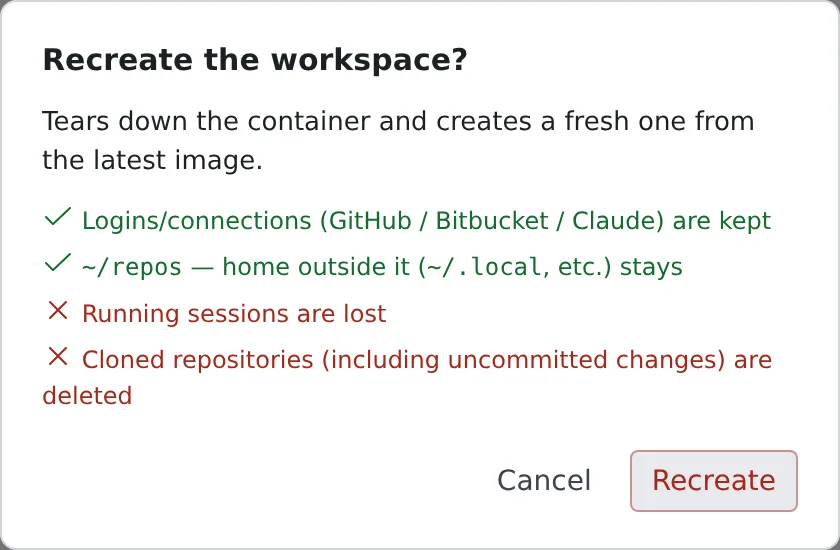
After the recreate, clone your repositories again.
Clean home
Section titled “Clean home”Recreate deletes only ~/repos, so it does not help when the cause sits elsewhere in your home: a tool you installed
in ~/.local is broken, or a cache or dotfile has gone wrong. For that, use Clean under Clean home on the same tab.
Try Recreate first, and clean home only when that does not fix it. Your logins and connections keep working after a clean.
When it goes wrong
Section titled “When it goes wrong”There is no Danger zone tab
Section titled “There is no Danger zone tab”This deployment cannot recreate the workspace or clean its home, because the home is somewhere the Control Plane cannot reach. Stop and Start still work from the workspace bar.
The recreate takes a long time
Section titled “The recreate takes a long time”On some deployments it takes a few minutes. Meanwhile the workspace shows as starting, with Removing what Recreate / Clean home deletes from your home….
“Recreate / Clean home did not finish, so the workspace was left stopped”
Section titled ““Recreate / Clean home did not finish, so the workspace was left stopped””Deleting the files, or the start after it, failed, and the workspace is stopped. Read the reason shown, then start the workspace again or recreate it again.
Related
Section titled “Related”- Choose your toolchains
- See your machine and its usage: free up space on the home disk