
Replace and stop slots
This is for AWS ecs-ec2 deployments only. Move workspaces off outdated slots onto new ones, and stop a slot that no longer answers.
On ecs-ec2 a workspace runs on an EC2 slot taken from a pool, and its home is an EBS volume that stays attached to that slot while it is stopped. How to build the pool, and its parameters, are in Start using the EC2 slot pool.
How it works
Section titled “How it works”| What you do | What happens |
|---|---|
| Nothing | A workspace whose home is on an outdated slot moves to a new slot at its next start. A free outdated slot is terminated by the sweeper |
| Press “Replace at next start” | The workspace on that slot always moves to a new slot at its next start, and never goes back to the old one |
| Press “Stop (force)” | The commands queued on a slot that does not answer are cancelled and the instance stops. The home stays on it |
Watch the audit log for pool.slot_dark_detected |
You notice a slot that does not answer before anyone starts on it |
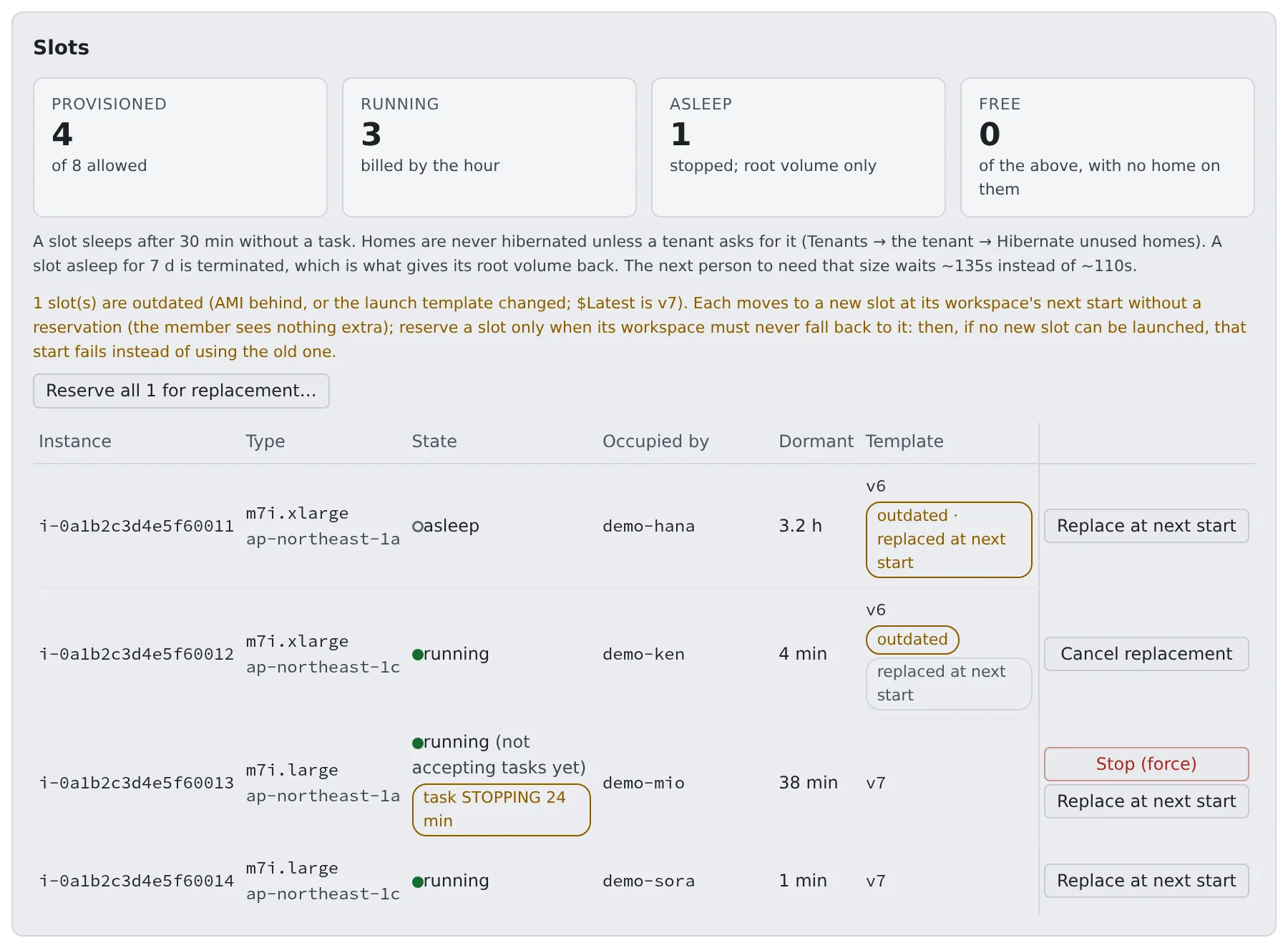
The slots page is “Admin” → “Slots”, and only super_admin can use it.
Outdated slots
Section titled “Outdated slots”A slot reads its user data only when it is launched, and a stopped workspace goes back to the same slot on its next start. A change to the slot launch template (a release’s security setting, for example) therefore does not reach the slots you already have. Replace them here instead of terminating instances by hand.
A slot is “outdated” in either of these cases. The tooltip gives the reason.
| Reason | Detail |
|---|---|
| AMI behind | Its AMI is not Amazon’s current ECS-optimized AMI for its architecture |
| Template changed | The slot launch template changed in something other than its AMI |
- The Control Plane reads Amazon’s public SSM parameters about every hour and launches every slot, x86_64 and arm64, with the current AMI. Slots follow Amazon’s updates without a stack deploy
- The launch template version number alone does not decide. A version that only moved the AMI does not make an arm64 slot outdated
- If SSM cannot be read, launches use the last value read, or else the CloudFormation values. No slot is called outdated on an AMI the Control Plane does not know
- There is no grace period. The first new AMI makes every slot outdated at the first sweep
- A running workspace is never touched outside a start
Automatic replacement
Section titled “Automatic replacement”By default outdated slots are replaced automatically. The page shows “outdated · replaced at next start”.
- When a workspace starts and its home is on an outdated slot, that start moves it to a new slot. The member’s workspace bar shows nothing
- A free outdated slot is terminated by the sweeper
- If no new slot can be launched (capacity, quota), the start still succeeds on the old slot, and starts within the next 10 minutes stay on it without trying again
- Each automatic move is in the audit log as
pool.slot_replace_auto - To turn it off, set
AF_ECS_EC2_AUTO_REPLACE_OUTDATED_SLOTS=falseon the Control Plane
Reserve slots yourself
Section titled “Reserve slots yourself”Reserve a slot yourself when its workspace must never go back to it. A start that cannot launch a new slot then fails instead.
- Open “Admin” → “Slots”. The “Template” column shows the launch template version each slot was launched from
- Reserve
- To reserve them all, press “Reserve all N for replacement…”. It lists the outdated slots and the workspace on each; check them and reserve
- To reserve one, press “Replace at next start” on its row. A reserved row shows “replaced at next start”; “Cancel replacement” takes it back
- Nothing happens to a running workspace. Its member sees “Moves to a new slot” in the workspace bar
- The member’s next stop and start launches a new slot with the current AMI and
$Latest, moves the home onto it and terminates the old one. That start takes about 25 seconds longer than usual. Files, repositories and logins come along; the home is never deleted
Reservations and cancellations are in the audit log as pool.slot_replace_reserve / pool.slot_replace_cancel, with the workspace that moves.
| Symptom | Cause and fix |
|---|---|
| A reserved workspace’s start fails with a reason | No new slot could be launched (capacity, quota). The reservation stays, and the workspace is never put back on the old slot. Retry later |
| A reserved slot is gone | The sweeper terminates a reserved slot with no workspace on it |
How to verify the result is in Move slots onto new user data.
Move slots onto new user data
Section titled “Move slots onto new user data”The workspace task adds SYS_ADMIN so Chromium’s setuid chrome-sandbox can create its namespaces. The slot settings below go with it, and each applies only to slots launched after the template carries it. A slot launched earlier is not protected until it is replaced: a new launch template version, then the steps below.
| Setting | What it does | On an older slot |
|---|---|---|
user.max_user_namespaces=0 |
No unprivileged user namespaces, so SYS_ADMIN stays reachable only through the setuid helper. Persisted in /etc/sysctl.d/99-af-userns.conf and applied before the ECS agent configures; the user data stops on failure, and an ecs.service drop-in refuses to start the ECS agent unless the value is 0, also after a reboot |
The task keeps the default limit and can create user namespaces |
The home volume mounted nosuid,nodev by af-mount |
Setuid binaries and device files on the home do nothing | An already mounted home keeps its old options until it is unmounted and mounted again (a slot move does that) |
ECS_AWSVPC_BLOCK_IMDS=true in the slot’s ecs.config |
Keeps a workspace task off the slot’s instance profile (SlotRole) through IMDS. The launch template’s hop limit does not, because an awsvpc task’s ENI reaches IMDS directly |
Stays open until the slot is replaced |
kernel.unprivileged_bpf_disabled(1) andkernel.perf_event_paranoid(2) were already strict on AL2023 and are not set- The task definition gains the capability on a workspace’s next start (a new revision); no slot change is needed for that part
- The ECS agent reads
ecs.configwhen the slot is launched. Nothing replaces a slot by itself, and a workspace stop and start goes back to the same slot (its home stays attached while stopped) - Until then the Agent’s own isolation still holds for every SDK that honours
AWS_EC2_METADATA_DISABLED, but not for a tool that calls IMDS directly
To finish the move:
-
Update the pool stack.
update.shdoes it. By hand (parameters keep their previous values) it is the command below. The Control Plane launches slots from the template’s$Latest, so only new slots changeTerminal window aws cloudformation deploy --stack-name <pool stack> --template-file cfn/40-ec2-pool.yaml \--capabilities CAPABILITY_NAMED_IAM -
Most slots need nothing: they are replaced by themselves (Automatic replacement). Reserve them when a workspace must never go back to its old slot (Reserve slots yourself)
- Each automatic move is in the audit log as
pool.slot_replace_auto(actorslot-auto-replace), naming the workspace, the old version,$Latestand the new slot. A slot whose version cannot be read is left alone - To switch it off, for example while a new template is being validated, set
AF_ECS_EC2_AUTO_REPLACE_OUTDATED_SLOTS=false. Reservations still work - A reservation is a tag on the instance (
af-slot-replace). It moves nobody by itself and touches no running session
- Each automatic move is in the audit log as
-
Members stop and start their workspaces when it suits them. The start launches a new slot of the workspace’s class from
$Latestfirst, moves the home off the old slot through the same release the sweeper uses (unmount before detach; refused while a task runs) and terminates the old instance- The home volume is never deleted
- Do not terminate slot instances by hand while a home is attached
Ec2SlotTerminateAfterSecis not for this; it is a standing cost trade-off (Three limits)
-
Verify from a shell in a workspace on a new slot
-
The IMDSv2 token request must not answer
200(it times out:000), also with a clean environment (env -i)Terminal window curl -s -o /dev/null -m 3 -w '%{http_code}' -X PUT -H 'X-aws-ec2-metadata-token-ttl-seconds: 60' http://169.254.169.254/latest/api/token -
aws sts get-caller-identitymust fail with “Unable to locate credentials” -
Slots still join the cluster and SSM still reaches them (the “Slots” page, a workspace start, the home mount), and the workspace’s logs still arrive
-
Protect the management agents from running out of memory
Section titled “Protect the management agents from running out of memory”So that a workspace that eats all the memory does not leave a slot whose EC2 is healthy but whose agents no longer answer, the slot’s user data gives the management processes a memory floor.
| Target | Floor |
|---|---|
| SSM agent | 192 MiB, systemd MemoryMin |
| docker | 256 MiB, systemd MemoryMin |
| containerd | 128 MiB, systemd MemoryMin |
| ECS agent | 192 MiB, memory.min on its scope, set by the helper service af-protect-mgmt |
system.slice |
832 MiB in total, so the children’s floors take effect |
- The ECS agent runs as a docker container, not as a child of
ecs.service, soaf-protect-mgmtlooks for its scope. It re-applies every 30 seconds, so it follows an agent restart af-protect-mgmtalso lowers the OOM score of the ECS and SSM agents, including an SSM agent already running at first boot- When memory runs short, the kernel reclaims the workspace containers’ pages first
- The total fits inside the host reserve (
AF_ECS_EC2_HOST_RESERVE_MB, 2 GiB under the defaultauto). A reserve below 832 MiB makes the protected amount exceed the reserve - It assumes cgroup v2 (the Amazon Linux 2023 default)
This is a launch template change. It reaches existing slots only through the replacement in Outdated slots.
Stop a slot that does not answer
Section titled “Stop a slot that does not answer”A slot can stop answering: the EC2 instance is running and its status checks are ok, but its ECS agent is not connected, SSM does not answer, and a member’s home is still attached. That member’s starts then wait or keep failing.
The page shows such a row with “(not accepting tasks yet)” and offers “Stop (force)”.
Update the 20-platform stack first. The Control Plane role needs ssm:ListCommands, ssm:CancelCommand and ssm:DescribeInstanceInformation (statement SsmSlotForceStop in 20-platform). Without them the health check fails with AccessDenied and the action cannot run.
- Press “Stop (force)” on the row. The confirmation names the workspace on the slot; check it and stop
- The Control Plane takes the same ownership of the home as the automatic rescue (the
af-rescuemarker and a Start count of its own), ends the member’s start on that slot (their workspace reads as stopped), cancels the commands it queued, removes the task ENI if one is attached, and stops the instance. A pending umount or mount is what holds the home’s lock - The result (commands cancelled, whether Force was used) appears on the page. The audit log records
pool.slot_force_stopwith the workspace, both health signals, the predicate the slot met (predicate=darkorwedged;-when you overrode) and the counts - Wait for the row to show “asleep”. If the Control Plane removed the task ENI (it deregistered the container instance), the slot is reserved for replacement: the member’s next start launches a new slot, moves the home there and retires the old one, because the old slot’s ECS agent does not register again. Otherwise the next start wakes this same slot through the ordinary path, the reboot clears what was stuck, and the ECS agent reconnects
The slot is not quarantined, and the home stays on it until the next start. Keeping an instance as evidence is what quarantine is for, and a slot that does not answer is never quarantined automatically.
How the stop proceeds
Section titled “How the stop proceeds”- It sends a normal shutdown first, so the kernel can unmount the home. If the instance has not stopped after 3 minutes, the Control Plane sends it again with Force. Pressing the button again while it is stopping forces it at once. A timer never acts on an instance started again since
- For a slot that holds a home, every step runs under the rescue’s ownership token and guarded section, so a member’s start that arrives meanwhile wins and nothing more is done. The stop is sent, the home is not detached, and the marker is removed when the stop has been sent. A slot with no home has nothing to own and takes the direct path
- If a rescue (or a wedged release) already holds the slot, the action is refused (
slot_rescue_active) while that rescue is running. Once it showsblocked, or has been running for more than 10 minutes, pressing the button takes it over under its own token and carries on with the ENI check and the stop, so a stuck rescue is never a dead end - If ECS still has a task network interface (ENI) on the slot, the Control Plane first force-deregisters the slot’s container instance and waits for the interface to go. The container instance registers again when the instance restarts
- An instance stopped with a task ENI attached comes back with two interfaces and no automatically assigned public IPv4. On a public subnet it has no egress and its agent cannot reconnect, so the ENI goes first, also when you override: the override replaces only the health check. A slot with no task ENI is not deregistered. Whether a restarted instance regains egress with a task ENI attached, with and without a NAT gateway, has not been measured, so the ENI-first order stays
- The page waits for the answer for about 50 seconds, so the reply arrives before the 60-second ingress timeout. For a slot that holds a home, the work itself belongs to the Control Plane once the ownership token is taken: closing the page does not interrupt it, it runs for up to 6 minutes, and the ENI wait gets at most 3 of them. If the page stops waiting first, the answer is “accepted, in progress” and the result is recorded in the audit log when the work ends. As soon as the container instance is deregistered the slot is reserved for replacement, so even if the ENI never goes, the slot is not offered again and the next start moves the home to a new slot. A slot with no home is held to about 50 seconds, with at most 30 of them for the ENI wait
When it is refused
Section titled “When it is refused”| Code | Meaning and fix |
|---|---|
slot_healthy |
The slot meets neither of the sweeper’s predicates as of now: dark (ECS agent disconnected, SSM not online and the Agent not answering) or wedged (ECS agent connected, and a task stuck STOPPING or the Agent dropping its probe while ECS says HEALTHY). A slot still inside the boot grace meets neither. The Console offers Stop (force) on a running slot that is only registered too, but only after you tick “I understand the agents still answer” in the confirmation, which sends the explicit override_healthy override (a slot already shown as wedged does not ask for it). Whatever the row says, a slot_healthy or slot_health_unknown answer makes the confirmation show the warning and the acknowledgement, and pressing again sends the override. That stops a workspace running on the slot. A slot whose ECS agent is silent but whose SSM is online, or the reverse, is not dark by that definition and needs the override |
slot_health_unknown |
A health signal (ECS, SSM, the task list or the Agent probe) could not be read, so the predicates cannot say. Retry, or override. The Console offers the override after this refusal, as it does after slot_healthy |
slot_rescue_active |
A rescue holds the slot and is not blocked yet. Wait until it shows blocked, or for 10 minutes, then press again |
slot_not_running |
The slot is already stopped |
slot_quarantined |
The slot is quarantined |
slot_task_eni_held |
The task ENI did not go in time. The instance keeps running. Wait a minute and press again |
slot_started_again |
The member started the workspace again meanwhile. The slot is theirs, so nothing more is done to it |
After the stop
Section titled “After the stop”| Symptom | Cause and fix |
|---|---|
| The workspace stays on “starting” | A start made while the instance is still stopping gives up waiting after about two minutes and stays on “starting” until its claim expires. Stop the workspace and start it again |
| The row shows “task STOPPING N min” | The agent could not report a stop, so ECS keeps the previous task as STOPPING. The service allows one task at a time, so the next start waits for it. Once the instance runs again its agent reports the stop; the member’s next start after a force-stop does that, or you can start the instance from the EC2 console. The Control Plane does not do it on its own |
Notice a slot that does not answer
Section titled “Notice a slot that does not answer”The Control Plane’s sweeper looks for slots that do not answer before anyone starts a workspace on them. It only reports: it never stops, deregisters or quarantines the slot. Stopping it is “Stop (force)”.
A slot is considered dark when all of these hold:
- It holds a home, and no start is in flight
- EC2 says
running, but its ECS agent is disconnected (or the instance is not registered) - SSM does not report it
Online - It was launched or started more than
AF_ECS_EC2_DARK_BOOT_GRACE_SEC(300 seconds by default) ago
| Stage | What happens |
|---|---|
| The first sweep that sees it dark | Tags the instance af-dark-since |
| A sweep that finds either agent healthy | Removes the tag. A stop and start of the instance voids it too |
Dark for AF_ECS_EC2_DARK_AFTER_SEC (600 seconds by default) |
Writes one log line and one pool.slot_dark_detected audit row |
AF_ECS_EC2_DARK_AFTER_SECis raised to at least the larger of the boot grace andAF_ECS_EC2_SLOT_LOST_AFTER_SECplus the sweep interval.0turns the scan offAF_ECS_EC2_DARK_SLOT_ACTIONisdetect(the default),offorrescue.rescueacts on a dark slot whose workspace is stopped: it takes ownership of the home, cancels the Control Plane’s pending commands on the instance, deregisters the container instance when a task network interface is still attached and waits for it to go, stops the instance, and detaches the home. The slot stays in service and the next start of that workspace finds its home free. It never touches a slot whose workspace service is up. If the interface does not go, or the instance does not stop, within its bound, the rescue stops there (the audit actionpool.slot_dark_blocked, the Slots table rungblocked), is retried every sweep, and a second attempt at a stop that did not finish uses Force. A blocked rescue is yours to resolve (the force-stop or the Terminate action).quarantineisrescueplus the quarantine rung described under Quarantine of a slot that keeps going dark. Keepdetectuntil the detect-only window has shown no false positive- Watch the audit log for a slot recorded as dark that was in fact healthy (an agent restart, a long stall). That tells you whether the thresholds are safe
- The Slots table shows a badge “last seen dark N min · observing” on the state cell of a running slot with an
af-dark-sincestamp for its current launch. N counts from the first dark observation and the tooltip gives the time. It is the last observation, not a live check: the stamp is removed by the next successful scan of that slot after an agent comes back, and until then it can outlive a recovery (for example when the scan is off, the home is detached, a start holds the slot, or an AWS read failed). A stop and start of the instance drops it at once. The pool API carries it asdark_sinceandrung.rungisobservingfrom the stamp, andrescuing,blockedorrescuedwhile a rescue’s marker is on the instance;quarantinedonce the slot has been quarantined (the badge readsquarantined; the row stays a slot). The badge can appear sooner thanpool.slot_dark_detected, which is written only afterAF_ECS_EC2_DARK_AFTER_SEC - The audit log shows
pool.slot_dark_detected,pool.slot_dark_rescued,pool.slot_dark_blockedandpool.slot_dark_quarantinedwith a one-line explanation as a tooltip. The last one’s detail ends withreason=, the same text as the instance’saf-quarantine-reasontag, so it outlives the instance
Quarantine of a slot that keeps going dark
Section titled “Quarantine of a slot that keeps going dark”With AF_ECS_EC2_DARK_SLOT_ACTION=quarantine the sweeper does everything rescue does and, in two cases, also quarantines the slot. It writes an instance tag af-quarantine-<home volume>-<count>, whose value holds a token, a reason and a time. The instance keeps af-role=slot: SSM, “Stop (force)” and every other action still reach it. A quarantined slot is held out of the pool: nobody is placed on it, the pool does not count it, and no sweeper stops, replaces or terminates it. Its root volume keeps billing until you terminate it. Nothing changes for a deployment that does not set quarantine. This is separate from the quarantine of a slot that failed to mount a home, which sets af-role=quarantined.
| Case | When | What is different |
|---|---|---|
| Dark again | A dark slot’s rescue begins within AF_ECS_EC2_DARK_REPEAT_WINDOW_SEC (86400, one day, by default) of the previous dark episode on the same instance |
The rescue runs as usual. The slot is quarantined after the instance has stopped and before the home is detached, so no other workspace can be placed on it in between. The reason starts repeat |
| Blocked | A rescue has been blocked for AF_ECS_EC2_RESCUE_BLOCKED_AFTER_SEC (1800 seconds by default) |
The slot is quarantined where it stands. The rescue keeps being retried every sweep, so the home still comes off once the instance stops. The reason starts rescue-blocked |
- Quarantine is a tag and nothing else. It never detaches a volume by force, and it never stops or terminates the instance. A forced detach of a blocked rescue is not available
- A slot whose workspace service is up is never rescued, so it is never quarantined either
- Only dark episodes count towards “dark again”. An episode that ended in the wedged release or in an operator’s force-stop is not counted, and a repeat of the wedged condition does not quarantine
- The previous episodes are kept as one tag each,
af-wedge-at-<time>, and the newest counts. Records older than the window are removed by the sweeper, and the oldest ones are removed first when the instance is at EC2’s 50-tag limit. An instance that still carries the older singleaf-wedge-attag has it read as one more record - The token in an
af-quarantine-*tag is the home the rescue held and that workspace’s start count. A quarantine counts only while that token is still the instance’s own. When the workspace starts again, or another workspace’s home is on the instance, the tag is void: it is ignored by every placement and sweep and the sweeper deletes it. When a start or stop of the workspace counts while its home is on the quarantined slot, the quarantine is written again for the new count first, so the slot stays held and that start moves the home off it. So a quarantine write that reaches EC2 late cannot hold a slot that has moved on. At worst a late write holds an idle slot with no home, and you clear it by deleting the tags - The Slots table shows the row with the rung
quarantinedand the reason, and the pool API carriesrung: quarantined. Quarantine is audited once, aspool.slot_dark_quarantined
Terminate it. The Console’s “Terminate” is for slots that failed to mount a home, not for these. A quarantined slot keeps af-role=slot, so a start may be choosing it at the moment you press the button, and nothing in the Control Plane can lock that start out: terminating could end an instance that a home was just placed on. Terminate it from the EC2 console instead, once its row shows no workspace and no start is in progress. For a slot quarantined as blocked, “Stop (force)” takes the rescue over as for any slot; the rescue or the member’s next start then moves the home. Terminating removes the evidence on the instance, so read the reason first or take it from the audit row.
Return it to service. Press Return to pool at the end of the slot’s row (a row whose rung is quarantined and that has no Terminate button). The confirmation shows the reason. The Control Plane then deletes the slot’s af-quarantine-* tag, matching the value the row showed, so a slot that was quarantined again after you loaded the page is refused (409, reload the view) rather than returned. When the workspace’s home is still on the slot, it takes that workspace’s start lock first, refuses while a start is placing the home (409, try again), and moves the workspace’s start count on after the delete, so a quarantine write that was already on its way, or a rescue that still holds the old token, no longer holds the slot. That holds only when the count was moved: with no home on the slot, or if the move failed (the Control Plane logs it), a late write can bring the quarantine back. If the row shows quarantined again after a reload, press Return to pool once more. The action is audited as pool.slot_return with the reason. It is for super administrators only, and it never touches a slot that failed to mount a home (af-role=quarantined, the Terminate kind). The af-wedge-at-* tags stay: if the slot goes dark again inside AF_ECS_EC2_DARK_REPEAT_WINDOW_SEC it is quarantined again; delete them with your own credentials to give it a clean history. Whether the slot should be returned at all is your call: a slot that went dark twice in a day is probably the one to terminate. Without the button (an older Control Plane), delete the af-quarantine-* tags on the instance yourself; the Control Plane’s role may do this, and so may yours.
A slot that answers but is stuck
Section titled “A slot that answers but is stuck”The same sweep looks for the opposite shape: a slot whose ECS agent is connected, but whose workload cannot make progress. By default it only reports; AF_ECS_EC2_WEDGED_SLOT_ACTION=release adds the release described below.
A slot is considered wedged when it holds a home, no start is in flight, EC2 says running (launched more than the boot grace ago), its ECS agent is connected, and either:
- a task of its workspace has been
STOPPINGfor longer than 7 minutes (the 120-second ceiling of the stop timeout plus 5 minutes), or - the workspace Agent drops the Control Plane’s health probe while ECS reports the task
HEALTHY. The probe is made only when every task of the service is on that slot; during a task replacement it is unknown and counts for nothing
| Stage | What happens |
|---|---|
| The first sweep that sees it wedged | Tags the instance af-wedged-since |
| A sweep that finds it healthy, or its ECS agent disconnected (the dark scan’s case) | Removes the tag. A stop and start of the instance voids it too |
Wedged for AF_ECS_EC2_WEDGED_AFTER_SEC (600 seconds by default) |
Writes one log line and one pool.slot_wedged_detected audit row (signal is task_stopping or agent_probe_failed) |
AF_ECS_EC2_WEDGED_AFTER_SECis raised to the same floor as the dark scan’s.0turns the scan offAF_ECS_EC2_WEDGED_SLOT_ACTIONisdetect(the default),offorrelease, separate from the dark scan’s setting.releaseacts on a slot that has been reported (pool.slot_wedged_detected): it takes ownership of the home, puts the workspace service at 0 as a Stop does, unmounts the home through SSM, waits until ECS reports every task of the workspaceSTOPPED, and detaches the home. The slot stays in service and the instance is not stopped or deregistered, because its agents answer. The member’s workspace on it is stopped, so the next start finds its home free. It re-checks that the slot is still wedged just before it acts, and a start by the member in the meantime wins: nothing is detached from under it. Keepdetectuntil the detect-only window has shown no false positive- A release needs SSM
Onlineon the slot for the unmount. When it is not, the Control Plane does not touch the slot and records onepool.slot_wedged_blockedrow (reasonssm_offline); it releases once SSM is back. If the unmount, or the task stopping, does not finish within its bound (3 minutes for the unmount), the release stops there with the home still attached, recordspool.slot_wedged_blockedonce, and retries every sweep. A completed release recordspool.slot_wedged_released - A read that fails counts for nothing: the slot is neither tagged nor cleared
- The Slots table shows a badge “last seen wedged N min · observing”, with the same meaning as the dark badge (the last observation, not a live check). The pool API carries it as
wedged_sinceandwedged_rung.wedged_rungisobservingfrom the stamp, andreleasing,blockedorreleasedwhile a release’s marker is on the instance
Related
Section titled “Related”For agents
Send this prompt to your agent to read this page.
Read https://agent-fleet.org/docs/operate/aws-ecs/slot-maintenance/index.md